Best AI Keyboard App for iPhone
Typing on a phone makes writing professional emails, social captions, or essay outlines slow and prone to errors. A smart AI keyboard changes this by building an advanced writing coach directly into your iOS keyboard. Write, translate, and fix grammar inside any application without switching apps.
The power of an integrated keyboard assistant
Copying and pasting text back and forth between your chat app and your email client is a hassle. With the GenAI Smart Keyboard, the assistant lives inside your native keyboard interface. Tap a button inside Mail, WhatsApp, or Twitter to automatically rephrase text, translate languages, draft long replies, or scan and resolve grammatical mistakes instantly.
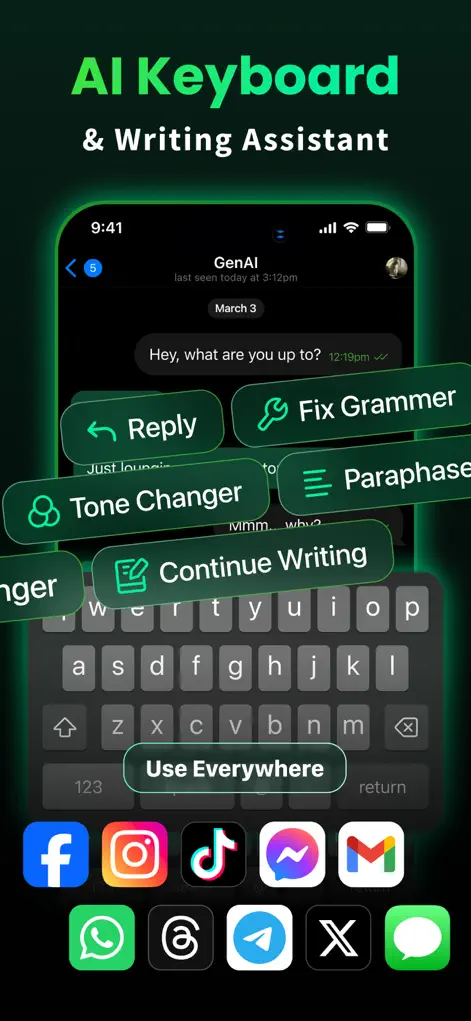
Step-by-Step: Best AI Keyboard App for iPhone
- Enable GenAI in iOS Settings. Go to Settings > General > Keyboard > Keyboards > Add New Keyboard and select GenAI.
- Switch keyboards in any app. Tap the Globe icon on your keyboard to switch to the GenAI typing assistant interface.
- Choose a writing prompt. Tap one of the built-in prompts like 'Professional Email Outline' or 'Polite Reply' to write templates instantly.
- Scan and fix errors. Select your draft and let the AI instantly analyze and rewrite it with perfect spelling and tone.
Start Chatting with AI
GenAI is free to download on the App Store. Ask questions, generate images, or enable the smart keyboard instantly.
⬇ Download GenAI AppFrequently Asked Questions
Does the keyboard log my keystrokes?
No. The keyboard processes commands locally and respects your privacy. No personal input is tracked or stored.
Does it work in WhatsApp and Gmail?
Yes, it works inside any input field in all iOS apps including Messages, Slack, WhatsApp, and Mail.
Can the keyboard translate languages?
Yes, the keyboard has real-time translation prompts that translate your typed text into dozens of languages.
GenAI is an AI-powered assistant. Information generated by the chatbot should be verified, and images or documents scanned should not contain confidential personal data.